Smart Clipping

13 Best Cameras for Ecommerce Product Photos

13 Best Cameras for Ecommerce Product Photos

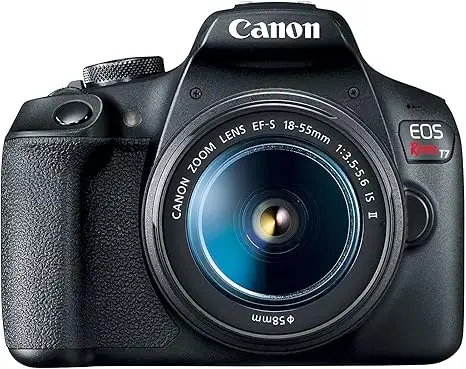
Want to know what is the best camera for ecommerce product images? Trying to find the perfect camera to make your products look sharp, detailed, and professional? If you’re selling online, product photos are everything. They’re the first thing customers notice, and high-quality images can make or break a sale. Blurry, poorly lit photos can turn buyers away, while crisp, high-resolution shots build trust and increase conversions. But here’s the big question: Which camera should you use for ecommerce product photography? In this guide, I’ll walk you through the best cameras for ecommerce, covering budget-friendly options, professional-grade picks, and the key features you need to look for. Whether you’re an Etsy seller, an Amazon FBA merchant, or running your own Shopify store, you’ll find the right camera to take your product photos to the next level. Now that you know why a high-quality camera is essential for ecommerce, it’s time to check out the best cameras for product photography.  I’ve put together a list of the top 13 cameras best cameras for eCommerce product photos based on budget, features, and image quality. This will help you to find the perfect fit. Why a Good Camera Matters for Ecommerce Photography First Impressions: How Images Impact Sales Think about the last time you bought something online. Did you check the product images before reading the description? Most people do. Studies show that high-quality product photos increase conversions by up to 30% [source]. Here’s why professional images matter: Simply put, if your photos don’t look professional, customers may think your product isn’t worth buying. That’s why investing in a good camera is one of the smartest moves you can make for your online store. Need Help With Ecommerce Product Photo Editing Contact Smart Clipping The Difference Between a Smartphone and a Professional Camera A common question I hear is: Can I just use my iPhone or do I really need a professional camera? The truth is, smartphone cameras have come a long way. The latest iPhones and Samsung Galaxy devices take great pictures, but they still have limits when it comes to ecommerce photography. Here’s a side-by-side comparison: Feature Smartphone Camera Professional Camera (DSLR/Mirrorless) Image Quality Good, but lacks depth High-resolution, detailed images Lens Options Limited, fixed lens Wide variety (macro, zoom, prime) Low-Light Performance Struggles in dim lighting Handles low light better Background Blur (Bokeh Effect) Software-based (less natural) Real optical depth of field Manual Settings Limited control Full control over exposure, focus, and color Smartphones work fine for quick social media shots, but if you want sharp, high-resolution images that stand out on your website, Amazon, or Etsy, a professional camera is the way to go.  The best cameras for ecommerce product images give you better lighting control, clearer details, and more editing flexibility. For Professional Clothing Image Editing Contact Smart Clipping Essential Camera Features for Ecommerce Product Photography Not all cameras are built the same. If you’re wondering what is the best camera for eCommerce product images, you need to focus on a few key features. Resolution & Megapixels – Do More MP Mean Better Photos? Many people assume that more megapixels mean better image quality. That’s not always true. A 12MP camera with a high-quality sensor can take better pictures than a 48MP smartphone camera with a small sensor. For ecommerce, a camera with at least 20MP is ideal for capturing sharp details. Lens Compatibility – Why It Matters for Different Products Different types of products require different lenses: Choosing a camera with interchangeable lenses gives you more creative freedom. Autofocus & Manual Controls – Getting That Sharp Look Blurry photos can make even a high-quality product look bad. A camera with fast autofocus and manual control options helps you capture sharp, professional-looking images with ease. Low-Light Performance & ISO Settings – Avoiding Grainy Photos Many ecommerce sellers shoot indoors, often with artificial lighting. A camera with good low-light performance and a high ISO range helps prevent grainy images, ensuring your product looks clean and professional. Wireless Connectivity – Speeding Up Your Workflow Transferring photos from your camera to your computer should be quick and easy. Many modern cameras offer Wi-Fi or Bluetooth connectivity, allowing you to send images straight to your editing software without cables. 12+ Best Ecommerce Photo Editing Software for Perfect Product Images Best Camera for Ecommerce Product Images – Top 13 Picks Picking the right camera for ecommerce photography can feel overwhelming. With so many options, how do you know which one will give you sharp, professional-looking product photos? I’ve put together a list of the 13 best cameras for ecommerce product images, covering budget-friendly options, mirrorless cameras, and high-end DSLRs. If you’re just starting out or looking for a pro-level upgrade then there’s a camera here for you. Let’s go over the best picks and their key features. A. Best Entry-Level Cameras for Ecommerce (Budget-Friendly Options) If you’re just getting started and need an affordable camera that still delivers great results, these are the best options: 1. Canon EOS Rebel T7 – Best for Beginners on a Budget The Canon EOS Rebel T7 is an excellent choice if you want high-quality product photos without spending too much. It has a 24.1MP sensor that captures sharp details, and its built-in Wi-Fi makes it easy to transfer images. Key Features: ✔ 24.1MP APS-C Sensor✔ Built-in Wi-Fi & NFC✔ 9-Point Autofocus Pros: ✅ Affordable and beginner-friendly✅ Good image quality for ecommerce photos✅ Wireless connectivity for quick transfers Cons: ❌ Limited low-light performance❌ Autofocus isn’t the fastest Best for: Small business owners, Etsy sellers, and beginners in ecommerce photography. What Type of Photos are Best for Wix Ecommerce? A Data-Backed Guide 2. Nikon D3500 – Best for Small Businesses Starting With Product Photography The Nikon D3500 is a simple yet powerful DSLR that takes sharp images with great color accuracy. It’s easy to use, making it ideal for sellers who don’t have much experience with cameras. Key Features: ✔ 24.2MP APS-C Sensor✔ 5 FPS Continuous Shooting✔ 11-Point

How to create advertising photos for my ecommerce clothing store

How to create advertising photos for my ecommerce clothing store according to experts

If you’re running an ecommerce clothing store, high-quality advertising photos are non-negotiable. You need images that make your products stand out, grab attention, and convince shoppers to buy. Think about it—when was the last time you bought clothes online without looking at the photos first? Exactly. Great product photography does more than just showcase your clothing. It builds trust, strengthens your brand identity, and ultimately boosts conversions. Without clear and visually appealing images, customers may hesitate to purchase, no matter how great your products are. In this guide, I’ll show you how to create advertising photos for my ecommerce clothing store from start to finish. We’ll cover everything from planning a photoshoot and choosing the right equipment to setting up lighting and editing your images like a pro. Whether you’re using a smartphone or a DSLR, you’ll learn practical tips to create photos that sell. Let’s dive in! Why Advertising Photos Matter for Your Ecommerce Clothing Store If you’re wondering why product photography is such a big deal, here’s the simple truth: People buy with their eyes. Since customers can’t touch or try on the clothes before purchasing, your images have to do all the convincing. How Product Photos Influence Ecommerce Success Your advertising photos are often the first thing a customer notices. High-quality ecommerce product images create a strong first impression and help customers visualize how the clothing will look in real life. Studies show that 93% of consumers say visual content plays a key role in their buying decisions. How Visual Appeal Drives Sales When you sell clothing online, your images must show details like fabric texture, stitching, and fit. A blurry or poorly lit photo can make your products look low-quality—even if they aren’t. High-quality clothing store photography can: The Importance of Consistency Consistency in professional product images helps maintain a cohesive brand identity. Whether you’re selling casual wear, formal dresses, or sportswear, your images should follow the same style, lighting, and editing pattern. A well-structured photo strategy keeps your website looking clean and polished. Related Post: How to Take Ecommerce Photos According to Experts How to create advertising photos for my ecommerce clothing store Planning Your Ecommerce Clothing Store Photoshoot Before you pick up a camera, you need a plan. Jumping into a photoshoot without preparation can lead to inconsistent images and wasted time. Here’s how to plan like a pro: Define Your Brand’s Visual Identity Your product photos should match your brand’s personality. If your brand is minimalist, go for clean white backgrounds and simple setups. If it’s trendy and playful, consider vibrant backdrops and creative styling. This ecommerce fashion photography style helps customers connect with your brand. Choose the Right Aesthetic Your clothing images should evoke the right emotions. Do you want a high-end, luxury feel? Use soft lighting and elegant poses. Selling streetwear? A raw, urban backdrop with dynamic poses might work better. Think about your ideal customer and create images that appeal to them. Plan the Types of Shots You Need For a complete product display, you need multiple shots, such as: Having a shot list ensures you don’t miss important angles and keeps your clothing product images consistent. For Professional Clothing Image Editing Contact Smart Clipping Choosing the Right Equipment for Stunning Advertising Photos You don’t need an expensive camera to take great advertising photos, but the right tools will make a big difference. Here’s what I recommend: Best Camera for Ecommerce Photography Choosing the Right Lens Lighting for Product Photos Lighting can make or break your photos. You have two main options: Using a lighting setup for product photos that eliminates shadows ensures clear and vibrant images. Tripods & Stabilization A tripod prevents shaky or blurry photos. Even if you’re using a smartphone, a simple tripod with a remote shutter button can improve image sharpness. Editing Software for Professional Product Images Editing helps enhance colors, remove imperfections, and make your images pop. Some great options include: Related Post: How to Add White Background on Ecommerce Photos Quick Setting Up the Perfect Background & Props Your background plays a big role in how your advertising photos turn out. A cluttered or distracting background can take the focus away from your clothing. To make your ecommerce images look professional, you need a clean and well-thought-out background. Why a Clean Background Matters A clean background makes your clothing stand out. It gives your images a polished, high-quality look that builds trust with customers. When shopping online, people expect professional product photos that clearly show what they’re buying. A messy background can make your store look unprofessional and drive potential buyers away. White Background vs. Creative Backgrounds Adding Props That Complement Your Clothing Props can enhance your ecommerce product images, but they should never steal attention from the clothing. A few ideas: Avoid using props that clash with your product or overwhelm the image. Keep it simple, and always make sure the clothing remains the star of the shot. 👉 Related Post: How to Tag Photos on Ecommerce Website for Maximum Visibility Mastering Lighting for Professional-Looking Clothing Photos Lighting can make or break your advertising photos. Even the best camera won’t fix bad lighting. To capture sharp, clear clothing images, you need to control the light source properly. Natural Light vs. Artificial Light – When to Use Each Best Lighting Angles to Highlight Textures & Colors To show off fabric details like texture and stitching, position your light source at an angle. Direct front lighting can make the image look flat, while side lighting brings out texture and depth. For clothing photography, here’s what works best: Common Lighting Mistakes to Avoid 👉 Related Post: Best Lighting for Product Photography Posing & Styling Clothing for the Best Advertising Impact Good styling and posing can make your clothes look high-end and appealing. If the clothing looks awkward or unflattering in photos, customers won’t buy. Choosing Models vs. Using Mannequins How to Style Clothing for a Polished Look Before shooting, make sure the clothing is wrinkle-free

How to Tag Photos on Ecommerce Website for Maximum Visibility (2025)

How to Tag Photos on Ecommerce Website according to experts

Want to know how to tag photos on eCommerce website for maximum visibility? If you’re looking to boost your online store’s performance and ensure your products get noticed, then photo tagging is the key.  You might already be aware that high-quality images are essential for ecommerce success. But did you know that the way you tag your photos can make or break your visibility? In this post, I’ll show you exactly how to tag photos on eCommerce websites in a way that enhances your product’s searchability, improves SEO, and ultimately drives more traffic and sales. Tagging is not just about adding random keywords. It’s about using strategic and well-thought-out tags that help search engines like Google understand your images.  This small step can lead to big rewards. Ready to learn how to get your product photos to stand out and climb the search rankings? Let’s dive in! What is Photo Tagging and Why Should You Care? Photo tagging means adding descriptive keywords to your product images. It makes them easier to find both on your website and in search engines like Google.  You can think of photo tagging as a way of telling search engines what your image is about. This helps search engines index your photos properly. It also improves your chances of showing up in search results. You might be wondering, “Why does this matter?” Well, proper tagging can improve your ecommerce SEO. Which directly influences your site’s product searchability.  When you tag your photos with the right terms, it makes it much easier for customers to find your products when searching online. This simple strategy can drive more traffic to your site. This results in more potential sales. For example, let’s say you’re selling men’s leather jackets. If you tag your photos with keywords like “men’s leather jacket,” “black leather jacket,” and “stylish leather jacket.” This tells Google and other search engines exactly what your products are.  This leads to better product image optimization. It makes it more likely your products will show up when someone searches for these terms. Imagine if your photos weren’t tagged, then no one would know what your products are! Tagging ensures that shoppers who are looking for exactly what you’re selling can find your images with ease.  If you haven’t started tagging your product photos then you’re missing out on potential visibility and traffic. How Product Photos Improve Ecommerce and Increase Sales How Photo Tagging Affects Your Ecommerce Website’s Performance Now, let’s talk about how proper photo tagging can affect your ecommerce website’s performance. First and foremost, tagging plays a big role in Google’s image search algorithm.  Google uses tags to understand what an image is about and whether it matches a user’s search. If your photos aren’t tagged well, then you’re missing out on a chance to appear in Google’s image search results. This means fewer clicks and less traffic. But photo tags don’t just help Google. They also help improve the user experience too. Imagine browsing an ecommerce site where every image is well-tagged and easy to identify.  The browsing experience is smoother, and it’s easier for customers to find what they want. When users can quickly find products through effective photo tags, they are more likely to make a purchase. Here’s a stat to illustrate the importance of tagging: Research shows that websites with optimized photos, including proper tags, experience a 40% higher click-through rate compared to those without.  This means that when your images are tagged right, your products are more likely to get noticed. This leads to higher conversion rates and more sales. If you think about it this way, photo tagging is like giving your customers a roadmap to the exact products they want. It helps them also find their desired items faster and creates a smoother journey from browsing to purchasing. Now that we’ve covered why photo tagging is so crucial, it’s time to dive deeper into the best practices for tagging your product images.  In the next section, I’ll walk you through the top photo tagging strategies that will make your ecommerce website stand out and get noticed. Keep reading to discover practical tips that will help you optimize your product images for maximum visibility. How to edit photos of clothing for an ecommerce site – 12 Best Ways How to Tag Photos on Ecommerce Website – Best Practices In this section, I’m going to walk you through the best practices for how to tag photos on eCommerce websites. This will make sure your product images get the attention they deserve.  The goal is simple: use tags that help search engines and shoppers find your products faster, which leads to more clicks, traffic, and ultimately, sales. A. Use Descriptive and Relevant Keywords for Ecommerce Photos Using the right keywords is essential when it comes to photo tagging. So, what makes a tag relevant? A relevant tag is one that accurately describes your product and what shoppers might search for. Long-tail keywords, which are specific phrases, can help you appear in more targeted searches.  For example, instead of just tagging a photo with “jacket,” try using “men’s leather bomber jacket” or “red winter jacket.” These specific phrases help you stand out in search results. Using long-tail keywords allows you to tap into a niche audience, which can lead to higher conversions. Tags like “leather” or “bomber jacket” describe the product’s material and style.  It makes it easier for people who are specifically searching for those items to find you. Product categories and product descriptions can also help make your tags more specific. You can use SemRush’s Keyword Research Tools to research keywords easily. This will increase the chances of your photos showing up when people search for specific products. Best Photo Editing App for Ecommerce Sellers of All Levels B. Include Product Features in Tags When tagging your photos, be sure to highlight product features such as color, size, material, and style. For example, if you’re selling shoes, tags like “blue leather sneakers”